
Patients require quick access to their medical records, which might not be readily possible for some practices relying on legacy record storage systems. Most practices have now moved towards Electronic Medical Record (EMR) for the storage of medical records. But what is EMR implementation?
EMR implementation involves a structured process for selecting, configuring, and deploying a new-age medical record system in an organization. It is primarily used in healthcare organizations to transition from legacy record systems to digital clinical documentation platforms.
According to the Office of the National Coordinator for Health Information Technology (ONC HealthIT), in 2021, adoption rates reached approximately 96% among non-federal acute care hospitals and 78% among office-based physicians.
In 2011, these numbers were as low as 28% and 34%, respectively. However, simply adopting an EMR system is no longer sufficient. The quality of implementation, its effectiveness, and the EMR data migration in this process determine whether the adopted new system is efficient enough to deliver value.
A poorly executed system implementation can disrupt workflows, compromise data integrity, and negatively impact patient care. Let us discuss what an EMR is, what makes it different from an EHR, the most prevalent challenges in implementation, as well as some evidence-based best practices.
What is an EMR System in Healthcare?
The first EMR system was introduced in 1972 by the Regenstrief Institute. Unfortunately, only large organizations could adopt it efficiently. However, federal incentives improved the uptake following the 2009 HITECH Act.
The ONC describes an EMR as:
A digitized version of paper charts used by clinicians for diagnosis and treatment within a single practice.
The EMR data migration involves secure transfer of sensitive patient information and clinical data, such as:
- Progress notes
- Medications
- Lab and imaging results
- Immunizations
- Patient/family history
- Diagnoses
- Demographics
- Allergies
Note: Progress notes are collected and maintained by one provider over time.
What Practitioners Can Do with EMRs
Did you know that with EMRs, medical practitioners can:
- Track data
- Improve overall care quality within the practice
- Identify patients requiring preventive screenings
- Determine patients against certain medical parameters
EMR vs EHR: What is the Difference?
Understanding the distinction between an EMR and an electronic health record (EHR) is significant. The simplest way to understand their difference is as follows:
An EMR is the digital record of a single practice. On the other hand, an EHR is much broader. The ONC explains that EHRs extend beyond the health organization that stores the information.
It is responsible for sharing data with:
- Specialists
- Laboratories
- External clinicians, who are a part of the patient’s care
This way, the information moves with the patient throughout the treatment journey. The following table comprehensively covers all the differences between EMR and EHR.
| EMR (Electronic Medical Record) | EHR (Electronic Health Record) | |
|---|---|---|
| Main Usage | A single clinic or provider maintains patient information. | Comprehensive medical record for a patient across multiple providers. |
| Data Accessibility | Typically provides accessibility to a healthcare facility. | Allows data sharing across different healthcare systems and organizations. |
| Information Level | Focuses on diagnosis and treatment details within one practice. | Broader patient information, history from various sources. |
| Data Exchange Capabilities | Little to no data exchange. | Supports seamless exchange of data among providers. |
| Users | One provider or care team. | Multiple providers, specialists, and healthcare settings. |
| Level of Patient Care | Supports care within a single practice. | Ensures coordinated and continuous patient care. |
Note: While federal programs primarily promoted EHR adoption, many organizations use the term EMR interchangeably in practice settings.
According to CMS guidance on Certified EHR Technology, healthcare providers who wish to qualify for the Medicare Promoting Interoperability Program must use EHR technology. The employed tech must also have a certification (according to the ONC 2015 Edition or 2015 Edition Cures Update) standards.
EMR Implementation & Data Migration Challenges
EMR implementation challenges have long been discussed because of their negative impact on data management. According to a 2016 systematic literature review by Kruse et al. published in the Journal of Medical Systems, the most commonly listed challenges in EMR implementation and data management include the following:
- Technical support
- Technical concerns
- Security and privacy concerns
- Resistance to change
- Cost
Similarly, a 2010 systematic review by Boonstra and Broekhuis in BMC Health Services Research sheds light on this matter. According to this study, healthcare professionals who engage in stand-alone practices also face challenges with EMR data migration and implementation systems. They mention the following challenges:
- Time-intensive procedures
- Technical training barriers
- Ongoing and start-up costs
- No uniform standards
- Confidentiality concerns
Moreover, the research authors summarize that EMR implementation should be treated as a change management project led by dedicated implementers.
Diving Deeper into the Challenges of EMR Implementation and Migration
During the EMR migration and implementation, the following challenges have surfaced, according to professionals.
Cost
Operational cost remains one of the biggest challenges among providers. The expenditure involves the cost of the upfront licensing/hardware and ongoing maintenance. These two remain a consistent challenge across various reviews for adoption.
Workflow Disruption
Workflow disruptions are a serious concern for professionals when considering an EMR implementation plan. This involves workflow redesign and staff training.
Similarly, clinician feedback during implementation also plays a crucial role in the success of adoption.
Resistance from Practitioners
Adopting EMR can be challenging for professionals who have long relied on legacy or traditional methods for data storage and sharing. Most of the resistance stems from the fear of productivity loss.
Physicians face a learning curve during this transition, which can be overwhelming for some professionals. Additionally, some professionals may feel unsure about the adoption’s clinical effectiveness.
Legacy System Data Quality
EMR migration is meant to be more effective, but it cannot rectify what legacy systems miss. Traditional methods involve plenty of human intervention, which also increases the likelihood of errors. Some common issues that may arise because of older systems include:
- Inconsistent code sets
- Free-text fields instead of structured data
- Duplicate patient records
These issues are often difficult to fully resolve during migration and typically require ongoing data governance post-implementation.
Interoperability Challenges
Adopting EMR across different domains is necessary, or professionals may not see full effectiveness. According to the ONC, approximately 70% of non-federal acute care hospitals engage in all four interoperability domains (find, send, receive, and integrate).
Additionally, smaller and independent organizations are substantially lagging behind larger systems and facilities. The result? A stressed medical care system.
HIPAA Compliance, Privacy & Security
Protected Health Information (PHI) is a crucial part of every EMR migration, which requires compliance with HIPAA regulations, including Business Associate Agreements (BAAs).
Since it involves sensitive information, the systems must also have encryption in transit and at rest to avoid unwanted access. Additionally, maintaining an auditable data lineage or chain-of-custody is strongly recommended.
Understanding the EMR Data Migration Process
The EMR data migration process is a part of the implementation, which structurally transfers different forms of clinical, demographic, and financial data from a legacy system to a modern-day EMR.
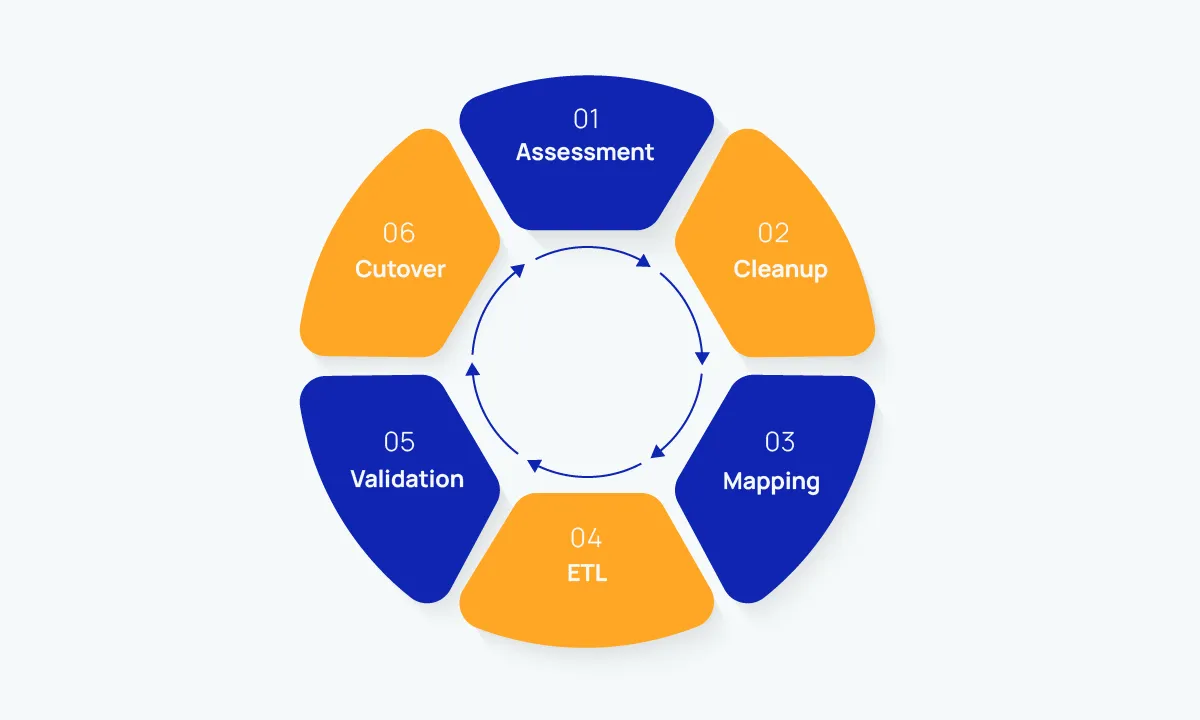
Moreover, this migration is a healthcare-specific application, and must be executed carefully due to regulatory and patient safety considerations within the Extract-Transform-Load (ETL) process. The following is a detailed breakdown of the six steps involved in data migration in EMR systems.
1. Scope Definition & Assessment
Listing whatever is present within the legacy system is the first step. This may include information such as:
- Scanned documents
- Patient’s medical history
- Patient demographic information
- Outstanding balances
- Medications
- Immunizations
- Imaging and lab results
- Health complications and problems
- Physician’s encounter notes
- Comprehensive billing records
- Allergies
Here, professionals must sort all the data to determine what will remain in the legacy system archive and what data to migrate to the new system.
2. Data Cleanup
As mentioned earlier, legacy systems had a higher chance of human errors to fix or remove before data migration. Therefore, before EMR migration, professionals must:
- Standardize free-text entries requiring coding
- Remove or fix orphaned records
- Reconcile identifier inconsistencies
- Fix duplicate patient records
Remember, migrating without cleaning up beforehand could move poor-quality data forward into the new system, placing future operations at risk.
3. Data Mapping
Every legacy field should be sorted into its accurate destination field within the new EMR system. These may include CPT/HCPCS & ICD diagnosis codes, medication codes, LOINC laboratory codes, and problem-list concepts.
Quick Note: Professionals should use standardized formats such as HL7 v2, C-CDA, or HL7 FHIR to support interoperability and data exchange.
4. Extraction, Transformation, Loading (ETL)
Once all the data has been mapped and sorted, it must be extracted from the traditional database. Once extracted, the data will then be transformed to match the destination schema and code sets. After the data has been transformed successfully, it is loaded into the new EMR.
5. Reconciliation & Validation
After the successful completion of ETL, professionals must reconcile all data before validating it. This means:
- Running spot checks for clinical content
- Reviewing a sample of migrated charts
- Resolving and logging discrepancies before cutover
- Comparing record counts
6. Cutover & Parallel Operation
Cutover is the last and crucial step in the EMR data migration process. It ensures missed data can be retrieved without placing patient care at risk.
Therefore, professionals must run both systems in parallel temporarily to ensure data integrity and continuity of care. Once migration is verified, secure the required records in an active archive.
EMR Implementation & Migration Best Practices
The most effective EMR implementation plans treat the initiative primarily as a change management project, not just a software deployment. The priority should be approaching it as a change management initiative.
The following are some of the most effective practices for EMR implementation and migration:
- Organizations should not rely solely on the new EMR system and should maintain a complete legacy data archive. It should include a read-only records repository that should be independent of the new EMR. However, it must be stored and retained (according to federal and state laws).
- Professionals may encounter various workflow gaps in the first 90 days. Therefore, you should be prepared financially for rapid:
- Changes in configuration
- Super-user support
- Structured feedback loop
- Define scope and success metrics to record counts to migrate and acceptable error thresholds. This improves the EMR system’s efficiency and readiness to go live. We also recommend adding a reversal plan in case the practice needs it.
- Keep HIPAA considerations in check throughout, which may include BAAs, access controls, encryption, and audit logging. HIPAA compliance should be a must for every system that touches the PHI when transitioning.
- Include clinics from the first day because their input determines and drives data-mapping decisions. It also identifies potential workflow risks before they become too serious.
- Focus on role-based training for various professionals. These may include physicians, physician assistants, nurses, billers, and front-desk staff. All these experts require specific training and proficiency checks before the migration completes.
- Avoid replicating paper-era processes digitally because it rarely works. Instead, try to re-engineer a new digital system altogether.
- Always pilot test before performing a comprehensive migration by running a sample dataset. This data can be sent end-to-end through the ETL, moved to validation, and sent for clinical review before the complete transition takes effect.
Simplify EMR Implementation with NeuraBill
EMR implementation and data migration are necessary yet challenging tasks for medical professionals. These operational upgrades require careful planning and following the essentials discussed in this guide.
If your in-house medical billing teams are still preparing for EMR transition or are facing challenges, our medical billing and coding services can eliminate the billing complexity and ease your transitions.